BLOG DETAILS

Sachin Pathak

Docker

20 May, 2026
Docker Multi-Stage Builds: Smaller, Safer Images
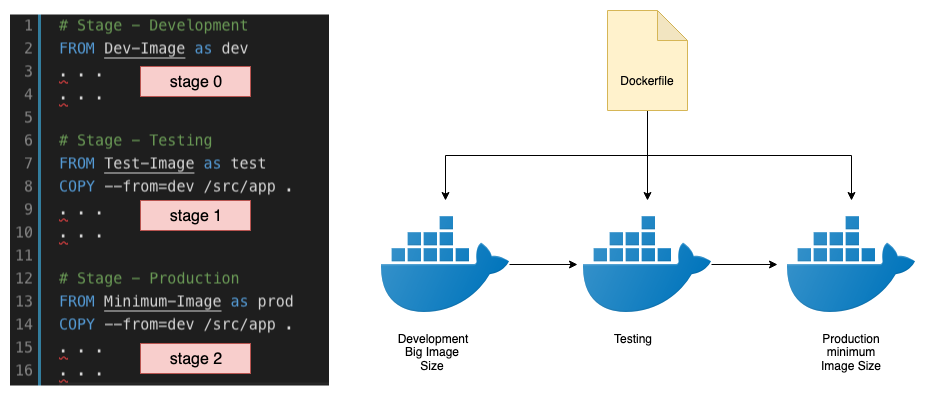
Big images are slow to push, pull and scan. Multi-stage Docker builds let you compile in a heavy builder stage and ship only the artifacts in a tiny final image.
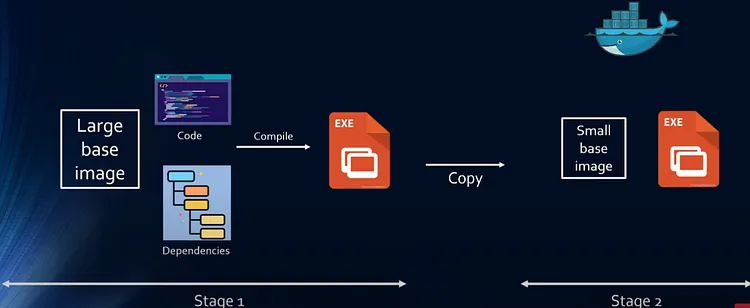
Build then copy
Use one stage to build and a second, minimal stage to run. Only the final stage is shipped, so build tools never reach production.
A two-stage Dockerfile
Compile in a full toolchain, then copy just the binary into a distroless base.
FROM golang:1.22 AS build
WORKDIR /src
COPY . .
RUN go build -o app .

FROM gcr.io/distroless/base
COPY --from=build /src/app /app
ENTRYPOINT ["/app"]
Smaller surface, faster CI
Distroless or alpine finals can cut image size 10x and remove the shells and package managers attackers love. Smaller images also scan and deploy faster.
Key Takeaways
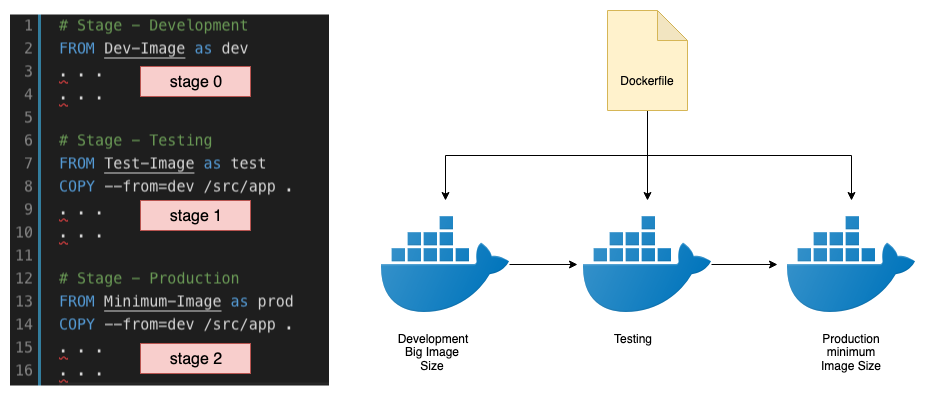
- Multi-stage builds separate the heavy build toolchain from a slim runtime image.
- The final image ships only the binary and its runtime dependencies — smaller and safer.
- Smart layer ordering and caching dramatically speed up rebuilds.
- A non-root user and a minimal base reduce the container’s attack surface.
- Smaller images pull faster, cutting deployment and cold-start times.
Wrapping Up
Multi-stage builds are free wins: faster pipelines, lower registry costs and a smaller attack surface.
3 Comments +8
Suneel Singh
24 Jan 2026Cut our image from 1.2GB to 90MB with multi-stage builds. The pull-time difference is huge.
Abhishek Anjana
25 Jan 2026The non-root user reminder is gold — people forget the security side of slim images.
Harsh Tiwari
27 Jan 2026Layer caching tips alone shaved minutes off our builds. Thanks!